Download Geometry Dash APK
- Updated
- Version 2.2.145
- Size 159.38 MB
- Requirements Android 6.0
- Developer RobTop Games
- Genre Arcade
- Google Play


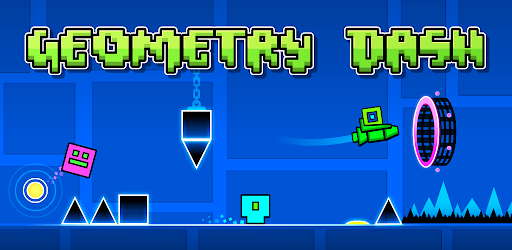
Whether you are a new player learning the basics or an experienced fan looking for a tougher challenge, Geometry Dash combines fast-paced platforming with memorable soundtracks, character customization, achievements, and a level editor that lets players build and share their own creations.
What Is Geometry Dash?
Geometry Dash is an action platform game built around precise timing and rhythm. Players guide a geometric character through obstacle-filled stages, tapping the screen to jump and using different movement mechanics as the level progresses.
Each stage requires you to react to obstacles while keeping pace with the music. A mistimed jump can send you back to the beginning, making practice and memorization important parts of the experience.
Beyond its main levels, the game includes customization options, achievements, rewards, and a level editor for creating and sharing user-designed stages. These features give players more ways to enjoy the game after completing its built-in challenges.
Geometry Dash – Game Overview
| Game Name | Geometry Dash |
|---|---|
| Developer Contact | support@robtopgames.com |
| Genre | Rhythm-Based Action Platformer |
| Gameplay Style | One-touch controls, precision jumps, and obstacle avoidance |
| Main Features | Rhythm-based levels, level editor, character customization, practice mode, achievements |
| Customization | Unlockable icons and colors |
| In-App Purchases | The supplied description states that there are no in-app purchases; check the current store listing for confirmation. |
Key Features of Geometry Dash
1. Rhythm-Based Action Gameplay
Music is an important part of Geometry Dash. Players must time their movements carefully while navigating obstacles that appear throughout each level. Learning the rhythm can help you anticipate jumps and react more confidently to difficult sections.
2. Challenging Levels and Soundtracks
The game features multiple levels with their own soundtracks and obstacle patterns. As you progress, the challenges test your timing, patience, and ability to remember sequences. Some sections can be especially demanding, making every successful run feel rewarding.
3. Simple One-Touch Controls
Geometry Dash uses a straightforward control system that is easy to understand. The challenge comes from knowing exactly when to tap. A single mistimed action can cause a failed attempt, so precision matters more than complicated controls.
4. Different Movement Mechanics
Players do more than jump over spikes. The supplied game description highlights rockets, gravity flips, and other movement mechanics that change how you navigate obstacles. Learning how each mechanic works is essential for handling different sections of a level.
5. Practice Mode
Practice mode gives players a way to improve their skills on difficult stages. Instead of relying only on repeated full attempts, you can use practice sessions to learn obstacle patterns and develop better timing before trying to complete a level successfully.
6. Create and Share Custom Levels
One of Geometry Dash’s standout features is its level editor. Players can build their own stages and share their creations, offering a different kind of challenge beyond the built-in levels. Designing a level also lets creative players experiment with obstacle arrangements and gameplay sequences.
7. Unlock Icons and Colors
Geometry Dash includes unlockable icons and colors that let you personalize your character. Achievements and rewards provide additional goals as you play, giving you reasons to keep improving and exploring the game.
8. Achievements and Rewards
Achievements and in-game rewards add another layer of progression. They encourage players to develop their skills, complete challenges, and work toward additional customization options.
How to Play Geometry Dash
The controls are simple, but completing the more difficult stages takes practice. These basic steps can help you get started:
- Start a level: Choose an available stage and pay attention to its music and obstacle layout.
- Tap to jump: Use the one-touch control to move over obstacles at the right moment.
- Watch the hazards: Look ahead for spikes, narrow passages, and changes in the level.
- Learn new mechanics: Adapt your timing when the gameplay introduces flight, gravity changes, or other movement sequences.
- Use practice mode: Work on sections that repeatedly cause you to fail.
- Try again: Use each attempt to learn the level and improve your reactions.
- Explore customization: Unlock available icons, colors, achievements, and rewards as you progress.
- Create your own levels: When you want a creative challenge, explore the level editor and its available tools.
Tips for Beginners
- Focus on timing: Avoid tapping randomly. Try to understand the spacing between obstacles.
- Listen to the soundtrack: The rhythm can help you recognize patterns and anticipate upcoming actions.
- Practice difficult sections: Use practice mode to become familiar with tricky parts before attempting a full run.
- Stay patient: Repeated failures are part of learning a demanding platformer. Focus on improving one section at a time.
- Learn each movement mechanic: Flying and gravity changes can require different timing from ordinary jumps.
- Take short breaks: If a level becomes frustrating, stepping away briefly can help you return with better concentration.
- Experiment with custom levels: User-created stages can provide new challenges and fresh ways to practice.
Why Is Geometry Dash So Challenging?
Geometry Dash combines automatic forward movement with obstacles that require accurate, well-timed actions. Players often have only a short moment to react, and even a small mistake can end an attempt.
The rhythm-based design adds another layer of difficulty. Players need to coordinate their reactions with the level’s pace while remembering obstacle patterns and adapting to different movement mechanics. This combination makes the game accessible to start but difficult to master.
Advantages and Things to Consider
Advantages
- Easy-to-understand one-touch controls
- Rhythm-based gameplay with unique soundtracks
- Challenging stages that reward practice
- Practice mode for improving difficult sections
- Level editor for creating and sharing stages
- Unlockable icons, colors, achievements, and rewards
Things to Consider
- Some levels can be very difficult
- Precise timing and repeated attempts are often necessary
- Fast sequences may frustrate casual players
- Custom-level features may depend on connectivity or current game support
Is Geometry Dash Worth Playing?
Geometry Dash is worth considering if you enjoy platformers that reward precision, rhythm, and persistence. Its simple controls make the basic idea easy to understand, while its obstacle patterns and demanding stages provide a substantial challenge for players who want to improve.
The level editor adds creative possibilities, and unlockable customization options give players extra goals beyond completing stages. However, those who prefer relaxed gameplay may find the repeated attempts and strict timing demanding.
Frequently Asked Questions
What is Geometry Dash?
Geometry Dash is a rhythm-based action platformer in which players jump, fly, and navigate obstacle-filled levels using precise timing and simple controls.
Is Geometry Dash difficult?
The game can be challenging because it requires accurate timing, quick reactions, and learning obstacle patterns. Practice mode can help players improve.
Does Geometry Dash have a level editor?
Yes. The supplied description lists a level editor that lets players create and share their own levels.
Can I customize my character in Geometry Dash?
Yes. The game description mentions unlockable icons and colors that players can use to personalize their character.
Does Geometry Dash include a practice mode?
Yes. Practice mode is listed as a feature and can help players learn difficult sections and improve their timing.
Does Geometry Dash have in-app purchases?
The description provided for this article states that there are no in-app purchases. Check the current official store listing to confirm the purchasing details for the version available to you.
Can I play levels created by other players?
The supplied description confirms that players can create and share custom levels. Access to shared content and online features depends on the game’s current functionality and connection requirements.
Where can I get Geometry Dash for Android?
Look for Geometry Dash through an official app store or a verified developer source. Before installing an APK from another source, verify the publisher and file authenticity, and avoid modified files from unknown websites.
Final Verdict
Geometry Dash combines rhythm, platforming, and precision challenges in a game that is easy to start but difficult to master. Its soundtracks, practice mode, character customization, achievements, and level editor give players several reasons to keep playing and improving.
If you enjoy fast-paced games that test your reflexes and reward persistence, Geometry Dash offers a distinctive challenge. Use a trusted installation source and check the current listing for the latest compatibility and purchasing information.
Developer Contact: support@robtopgames.com
Whats Mod of Geometry Dash
Unlimited MoneyWhats News of Geometry Dash
Update 2.209: • Platformer Saving • Death Tracking • Death Markers • Editor Sounds and Packs • Import/Export Editor Levels • Auto-Save and Auto-Backup levels • Custom Platformer Controls • Start Position Switcher • Group ID Names • Improved Editor UI and Tools • Pinch controls in Editor • Improved SFX Browser • Replay Daily, Weekly, and Event Levels • Improved Following and Friends • In-Game Notification system • Emotes 😀 • Improved messaging • News tab • Bug fixes, tweaks and more!Note: This article is based on the game description provided. Current version details, Android requirements, pricing, and availability should be confirmed through the official listing.
 Show/Hide
Mod info
Show/Hide
Mod info