

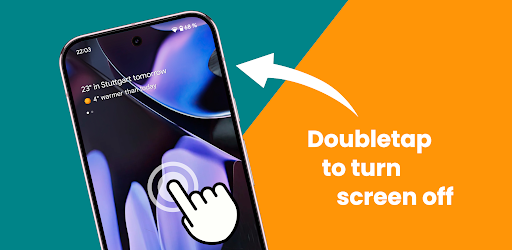
The app is optimized for Xiaomi devices running HyperOS, although it may also work on other Android phones. Its main feature is the ability to detect double taps on the home screen or lock screen, while its customizable screen-off animations provide additional personalization.
In this guide from EP Apk, we explain how HyperSleep works, explore its main features, and discuss the AccessibilityService permission it uses to provide its screen-locking functionality.
HyperSleep APK Information
| App Name | HyperSleep |
|---|---|
| Alternative Name | Double Tap Screen Off / Lock |
| Category | Tools & Personalization |
| Main Function | Double-tap to turn off the screen |
| Optimized For | Xiaomi HyperOS devices |
| Other Devices | May work on other phones |
| Screen Animations | Multiple customizable animations |
| Required Service | AccessibilityService API |
| Data Collection | Developer states that no data is collected or shared through AccessibilityService |
Note: The Android version requirement, APK size, current release number, and developer identity were not included in the supplied description. Check the current app listing for these details before installing.
What Is HyperSleep?
HyperSleep is an Android utility that introduces a double-tap screen-off feature for Xiaomi HyperOS devices. It allows users to turn off their display and lock their phone by tapping the screen twice instead of using the physical power button.
Unlike a traditional screen-off widget, which requires you to locate and tap a specific icon, HyperSleep is designed to detect double taps on the home screen. This makes the action more convenient because you can tap anywhere on the supported screen area to put your phone to sleep.
The app also offers different screen-off animations, allowing users to customize the visual effect displayed when the screen turns off.
Key Features of HyperSleep APK
1. Double Tap to Turn Off the Screen
The main reason to use HyperSleep is its double-tap screen-locking feature. Once configured, you can double-tap the supported screen area to turn off the display without reaching for the physical power button.
This can be particularly convenient when your phone is lying flat on a desk or table. Instead of picking it up to press the side button, you can simply tap the screen twice to put the device to sleep.
2. Double Tap Anywhere on the Home Screen
One of the differences highlighted by the developer is that HyperSleep does not require a dedicated screen-off widget. You do not need to find a particular icon or place a shortcut on your home screen.
The app adds double-tap detection to the home screen, allowing you to use the gesture across the supported area. This provides a more natural experience for users who prefer gesture-based controls.
3. Screen Locking Without the Power Button
Using the physical power button repeatedly may be inconvenient, especially if you frequently lock your phone throughout the day. HyperSleep provides an alternative method through its double-tap functionality.
This feature can make everyday phone use more comfortable and reduce the need to reach for the hardware button whenever you want to switch off the display.
4. Screen-Off Animations
HyperSleep is not limited to simply turning off the screen. It also includes different premium screen-off animations that change the visual effect when your phone goes to sleep.
If you find the default system animation unattractive or want a different look, you can choose from the available effects and personalize the experience.
5. Optimized for Xiaomi HyperOS
HyperSleep is specifically optimized for Xiaomi devices running HyperOS. Its main purpose is to introduce a double-tap-to-sleep gesture that may not be available in the exact form some users want through their existing system settings.
The developer also states that the app may work on other phones. However, compatibility can vary depending on the device manufacturer, Android version, home screen launcher, and system restrictions.
6. A Convenient Alternative to Screen-Off Widgets
Some screen-locking utilities depend on a widget or shortcut that users must tap to turn off the display. HyperSleep takes a different approach by detecting a double tap on the supported home screen area.
This means you can avoid adding another widget to your home screen and keep your layout cleaner while still having a convenient way to lock your phone.
How to Use HyperSleep on Android
To use HyperSleep, you will need to install the app and configure the required accessibility permission. The general setup process is as follows:
- Download and install HyperSleep from a trusted source.
- Open the app and review its available settings.
- Follow the instructions to enable the AccessibilityService permission required by the app.
- Review the permission details carefully before allowing access.
- Configure the available screen-off options and animation settings.
- Return to the supported home screen area and try double-tapping the screen.
- Choose your preferred animation from the available options.
The exact menus and permission steps may differ depending on your Xiaomi device and HyperOS version.
Understanding the AccessibilityService Permission
HyperSleep uses the Android AccessibilityService API to detect the home screen and allow users to turn off the screen with a tap. This permission is an important part of how the app provides its main functionality.
Accessibility services can receive access to certain screen and interaction information depending on the permissions requested and how the service is implemented. Therefore, users should always review the permission prompt and understand why an application needs it before enabling the service.
The developer states that no data is collected or shared through the AccessibilityService API. This statement describes the developer’s privacy disclosure; users who need additional assurance should also review the app’s privacy policy and other available documentation.
Advantages and Disadvantages
Pros
- Turns off the screen using a double-tap gesture.
- Designed primarily for Xiaomi HyperOS devices.
- Does not require a dedicated screen-off widget.
- Provides a convenient alternative to pressing the physical power button.
- Includes different screen-off animations.
- Offers customization options for the screen-locking experience.
- May also work on some non-Xiaomi Android devices.
Cons and Limitations
- Requires AccessibilityService permission to provide its main functionality.
- Compatibility with non-HyperOS devices is not guaranteed.
- Behavior may vary depending on the device and system version.
- The supplied description does not specify the exact Android version requirements.
Is HyperSleep Safe to Use?
HyperSleep explains that it uses the AccessibilityService API to detect the home screen and provide its double-tap screen-off feature. The developer also states that no data is collected or shared using this service.
However, because AccessibilityService is a sensitive Android permission, you should understand what it allows before enabling it. Install HyperSleep from a trusted source, verify that the app is the one you intended to install, and avoid granting permissions to applications you do not trust.
If you download an APK manually, read our guide on how to check whether an APK file is safe before installing it.
Frequently Asked Questions
What is HyperSleep APK?
HyperSleep is an Android utility that lets users turn off and lock their phone screen with a double-tap gesture. It is optimized for Xiaomi HyperOS devices.
Does HyperSleep work on Xiaomi HyperOS?
Yes. The app is specifically optimized for Xiaomi devices running HyperOS and introduces a double-tap gesture to turn off the screen.
Can HyperSleep work on other Android phones?
The developer states that it may work on other phones, but compatibility is not guaranteed. Results can depend on the device, operating system, and launcher.
Does HyperSleep require a screen-off widget?
No. Its main feature is designed to detect double taps on the supported home screen area, so you do not need to tap a dedicated screen-off widget.
Why does HyperSleep need AccessibilityService permission?
The app uses the AccessibilityService API to detect the home screen and allow the user to turn off the screen through a tap gesture.
Does HyperSleep collect personal data through AccessibilityService?
The developer states that no data is collected or shared using the AccessibilityService API. Review the app’s privacy documentation for further details about its overall data practices.
Can I customize the screen-off animation?
Yes. HyperSleep includes different screen-off animations that let users customize the visual effect when the display turns off.
How do I turn off my phone screen with HyperSleep?
After installing the app and enabling the required AccessibilityService permission, use the double-tap gesture on the supported home screen area to turn off the display.
Is HyperSleep a replacement for the power button?
It provides an alternative way to turn off the screen, but it does not physically replace the power button or necessarily provide all of its functions.
Final Verdict
HyperSleep: Double Tap Screen Off / Lock is a useful utility concept for Xiaomi HyperOS users who want a more convenient way to lock their phones. Its double-tap gesture removes the need to press the physical power button every time, while its screen-off animations add a layer of personalization.
The app is particularly worth considering if you prefer gesture-based controls and do not want to use a dedicated screen-off widget. Before installing, make sure your device is compatible and review the AccessibilityService permission carefully.
Download HyperSleep APK from a trusted source and follow the setup instructions to start using the double-tap screen-off feature.
Disclaimer: EP Apk provides informational content about Android applications. Compatibility, features, and permissions may change between releases. Always verify the latest app information and review requested permissions before installation.