Download Smart Launcher APK

- Updated
- Version 6.6
- Size 21.99 Mb
- Requirements Android 7.0
- Developer Smart Launcher Team
- Genre Personalization
- Google Play


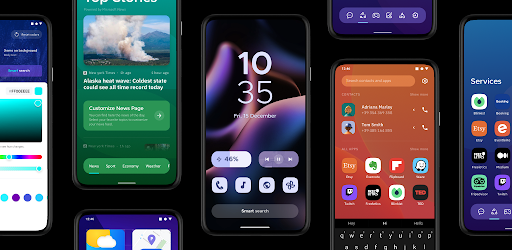
Beyond its minimalist home screen, Smart Launcher includes customizable widgets, flexible search, gesture controls, icon-pack support, and privacy options. Whether you want a simpler interface or more control over your phone’s appearance, Smart Launcher offers tools to build a home screen that suits your daily routine.
In this guide, EP Apk explains the main features, customization options, installation process, and privacy considerations of Smart Launcher for Android.
What Is Smart Launcher APK?
Smart Launcher is a home screen replacement for Android. A launcher controls how your home screen, app drawer, icons, and certain shortcuts appear and behave. By replacing your phone’s default launcher, you can change the way you access applications without replacing the Android operating system itself.
Smart Launcher focuses on automatic organization and practical customization. Its app categories help keep the app drawer tidy, while its adaptable themes and widget options let you create a layout that reflects your preferences.
The app is developed by Smart Launcher Team and is available on Google Play. The official listing reports more than 50 million downloads. View Smart Launcher on Google Play.
Main Features of Smart Launcher
1. Automatic App Organization
Smart Launcher automatically organizes installed applications into categories, helping you find apps without manually arranging every icon. This approach can make a busy app drawer feel more structured and easier to navigate.
2. Adaptive Themes and Customization
The launcher can adapt its colors to your wallpaper to create a more consistent appearance. You can also customize different parts of the interface, use compatible icon packs, and explore typography options, including Google Fonts, to personalize your home screen.
3. Convenient One-Handed Use
Frequently used apps and actions can be placed closer to the bottom of the screen, where they may be easier to reach with one hand. This layout is especially useful on phones with larger displays.
4. Built-In Widgets and Widget Stacks
Smart Launcher supports widgets for information such as weather, photos, calendars, battery status, music, and notes. Widget stacks let you keep multiple widgets in the same area and switch between them, helping you use screen space more efficiently.
5. Smart Search
The search feature helps you locate apps and contacts, search the web, perform calculations, and access supported actions from one place. It can reduce the time spent navigating menus when you need something quickly.
6. Custom Stickers and Flexible Layouts
You can personalize the home screen with custom stickers and position them alongside icons and widgets. Combined with themes and other layout settings, these options make it possible to create a distinctive interface instead of relying entirely on the default Android design.
7. Built-In News Reader
The launcher includes a customizable news reader with RSS support. You can follow compatible sources and keep up with selected topics directly from the home screen experience.
8. Gestures and Keyboard Shortcuts
Smart Launcher supports configurable gestures and hotkeys for certain actions, such as turning off the screen or opening notifications. Available actions depend on your settings, Android version, and device capabilities.
9. App Privacy Options
You can hide selected apps and protect access with a PIN using supported privacy features. The launcher can also display active app notifications without requiring an additional notification plugin, helping you keep track of activity from your home screen.
10. Wallpaper and Icon Controls
Smart Launcher supports adaptive icons, immersive layouts that can hide system bars, and wallpaper browsing from different sources. It also provides an option to back up your current wallpaper before changing it.
Smart Launcher APK – App Information
| App Name | Smart Launcher 6 |
|---|---|
| Developer | Smart Launcher Team |
| Category | Personalization |
| Platform | Android |
| Package Name | ginlemon.flowerfree |
| Pricing | Free installation with optional in-app purchases |
| Official Website | smartlauncher.net |
| Google Play | Official app listing |
Note: Smart Launcher is regularly updated. Features, compatibility, and pricing can change, so check the official listing for the latest details for your device and region.
Free Version and Premium Features
Smart Launcher is available to install from Google Play, with optional in-app purchases. Some customization options or advanced capabilities may depend on the version or purchase available within the app.
Before purchasing an upgrade, review the feature descriptions and current pricing displayed in Google Play or inside Smart Launcher. This helps you confirm which options are included and whether they meet your needs.
How to Install Smart Launcher on Android
To install the official version of Smart Launcher, follow these steps:
- Open the official Smart Launcher page on Google Play.
- Confirm the app name and publisher information.
- Check the compatibility details and review the permissions requested by the app.
- Follow Google Play’s instructions to install the launcher on your device.
- Open Smart Launcher and follow its setup instructions to customize your home screen.
- If Android asks you to choose a default home app, select Smart Launcher if you want to use it as your launcher.
If you choose to install an APK from another source, verify that it comes from a trustworthy publisher and has not been modified. Avoid unfamiliar files that request unexpected permissions or claim to unlock features through unofficial methods.
Accessibility Permission and Privacy
Smart Launcher can use Android’s Accessibility API to enable optional shortcuts, such as turning off the screen or opening notifications through a gesture. According to the developer’s description, enabling this permission is optional, and Smart Launcher does not collect data through the Accessibility API.
Accessibility access can allow an app to perform specific actions on your device, so it is important to understand why the permission is requested before enabling it. If you do not need the related gesture features, you can leave the permission disabled.
For additional details, consult the official Smart Launcher website and the privacy information linked from its Google Play listing.
Frequently Asked Questions
What is Smart Launcher APK?
Smart Launcher APK refers to the Android installation package for Smart Launcher, a home screen replacement that organizes apps and provides customization tools, widgets, search, and gesture controls.
Is Smart Launcher free?
Smart Launcher can be installed from Google Play, and the listing includes optional in-app purchases. Check the current app information to see which features require payment.
Does Smart Launcher organize apps automatically?
Yes. One of its main features is automatic app categorization, which helps keep the app drawer organized and makes applications easier to find.
Can I customize Smart Launcher’s appearance?
Yes. You can customize themes, use compatible icon packs, adjust the home screen layout, and use supported fonts, widgets, and stickers to personalize the interface.
Does Smart Launcher support widgets?
Yes. Smart Launcher supports widgets for several types of information and includes widget stacks that let you switch between multiple widgets in the same area.
Is Accessibility permission required?
No. According to the developer’s description, Accessibility permission is optional and is used for certain actions triggered by gestures, such as turning off the screen or opening notifications.
Can Smart Launcher hide private apps?
Smart Launcher offers options to hide selected apps and protect access with a PIN. Check the current app version for the available privacy settings.
Where can I download Smart Launcher safely?
The recommended source is the official Google Play listing. It helps you verify the publisher and find the release available for your device.
Final Thoughts
Smart Launcher is a useful option for Android users who want a more organized and personalized home screen. Its automatic app categories, adaptive themes, widget stacks, smart search, and gesture controls offer several ways to simplify everyday phone use.
Whats News of Smart Launcher 6 ‧ Home Screen
- Fixed duplicate phone numbers in contact search results - Fixed RSS feed adding to prevent duplicates and allow removed feeds to be added again - Improved widget setup and pinning so widgets keep the right size and failed additions clean up correctly - Fixed banding in panel backgrounds - Improved OPML import - Optimized resources sizeBefore installing, review the current compatibility information and decide whether you need its optional permissions and premium features. For more Android app guides and customization tips, explore EP Apk.