Download popupControl APK

- Updated
- Version 1.10
- Size Unknown
- Requirements Android 8.0
- Developer Jawomo
- Genre Tools
- Google Play


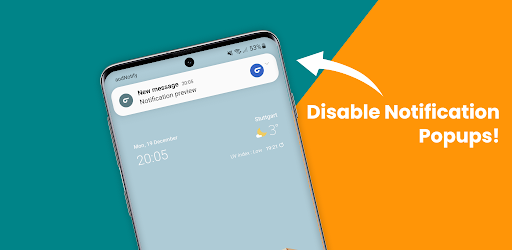
With popupControl, you can disable notification popups for an entire application or select specific notification categories. The app also provides options to disable all popups at once, keep them enabled only for high-priority notifications, and restore default settings whenever needed.
If you find floating notifications distracting while watching videos, playing games, reading, or using other applications, popupControl offers a convenient way to customize how these alerts appear on your phone.
In this guide from EP Apk, we explore the main features of popupControl, explain how its notification controls work, and discuss what you should know before installing the app.
popupControl APK Information
| App Name | popupControl |
|---|---|
| Alternative Name | Disable Notification Popups |
| Category | Tools & Notification Management |
| Main Function | Manage heads-up and peek notification popups |
| Popup Controls | Global, per-app, and per-category settings |
| Priority Settings | Option to enable popups only for high-priority notifications |
| Default Settings | Restore default settings |
| Development Stage | Beta |
Note: The supplied description does not specify the developer name, Android version requirement, APK size, or current release number. Check the latest app listing for these details before publishing.
What Is popupControl?
popupControl is a notification management application that helps Android users control which applications can display heads-up or peek notification popups.
Heads-up notifications are the temporary alerts that appear over the current screen when a notification arrives. Although they can be useful for important messages, they may interrupt activities such as watching videos, playing games, browsing the web, or reading.
Managing these notifications manually can be inconvenient because the relevant options may be located in different system and application settings. popupControl aims to simplify this process by bringing supported popup preferences together in a central list.
Instead of changing settings separately through multiple menus, users can select applications and notification categories and adjust their popup behavior from the app.
Key Features of popupControl APK
1. Disable Heads-Up Notification Popups
The main purpose of popupControl is to disable heads-up and peek notification popups. These alerts can appear over other content and interrupt what you are currently doing.
With the app, you can manage which notifications are allowed to appear as popups, helping create a less distracting experience without necessarily disabling every notification on your phone.
2. Disable All Notification Popups at Once
If you prefer a completely distraction-free screen, popupControl includes a popup preference feature that lets you disable all notification popups with a single click.
This option is useful when you do not want temporary notification banners appearing while using your device. It also saves time compared with changing the popup preference for every application individually.
3. Manage Popups for Individual Apps
Not every application needs to display notifications in the same way. For example, you may want to prevent social media applications from showing popup alerts while keeping important notifications from other apps visible.
popupControl provides a simple list view that lets you manage popup permissions for individual applications. You can choose which apps are allowed to display heads-up or peek notifications and which should remain silent on the screen.
4. Control Specific Notification Categories
One of the useful features of popupControl is its ability to manage notification popups by category rather than treating an entire application as a single group.
Some applications send different types of notifications, and not all of them may deserve the same level of attention. With category-level controls, you can disable popup alerts for selected notification categories while keeping other categories enabled.
This provides more flexibility than simply turning off every popup from an application.
5. Enable Popups Only for High-Priority Notifications
If you want to reduce interruptions without missing every important alert, popupControl offers an option to enable popups only for notifications with high priority.
This approach helps create a balance between fewer distractions and keeping selected alerts visible. Instead of allowing every notification to interrupt your screen, you can choose a more selective popup preference.
6. Restore Default Notification Settings
Changing several notification preferences can make it difficult to remember the original configuration. popupControl includes a restore default settings feature that allows users to return to the default popup setup.
This is particularly helpful if you experiment with different configurations and later decide that you prefer your phone’s original notification behavior.
7. Centralized and Simple Interface
Another advantage of popupControl is its central list-based approach. Instead of searching through multiple application settings and system menus, users can access the available popup controls from one place.
The goal is to make notification management more straightforward, especially for people who want to customize several applications without repeatedly navigating through different settings pages.
Why Use popupControl on Your Android Phone?
Notification popups can be helpful, but too many alerts may become distracting. popupControl gives users more control over which notifications appear on top of their current screen.
The app may be useful in several everyday situations:
- Watching videos: Reduce interruptions from incoming popup notifications.
- Playing games: Prevent unnecessary alerts from appearing over the game screen.
- Reading: Keep your screen cleaner by limiting unwanted notification banners.
- Working: Control which applications can interrupt your current activity.
- Managing social apps: Disable popup alerts from selected applications or notification categories.
- Keeping important alerts visible: Use the high-priority popup preference when supported.
How to Use popupControl
The general workflow is designed to make notification popup management easier. After installing the app, follow the available instructions to configure your preferences.
- Download and install popupControl from a trusted source.
- Open the application and review its available notification controls.
- Check the list of applications displayed in the interface.
- Select an application whose heads-up or peek popups you want to manage.
- Choose whether to disable popups for the entire application or selected notification categories.
- Use the global preference if you want to disable all popups at once.
- If preferred, enable the option that allows popups only for high-priority notifications.
- Use the restore default settings option if you want to return to the original configuration.
The exact setup steps and available controls may vary depending on your Android version and device manufacturer.
Understanding the Beta Version
According to the developer’s description, popupControl is currently in the beta stage. This means the application is still being tested and may receive changes, improvements, and additional features over time.
As with other beta applications, users may encounter occasional bugs, unexpected behavior, or compatibility limitations. The developer encourages users to submit feature requests and bug reports through the beta feedback option in the Google Play Store.
If you decide to use the beta version, consider sharing useful feedback when you encounter a problem. This can help the developer identify issues and improve the application for future releases.
Advantages and Disadvantages
Pros
- Disables heads-up and peek notification popups.
- Provides a central place to manage notification popup preferences.
- Allows popup controls for individual applications.
- Supports managing selected notification categories.
- Can disable all popups with a single click.
- Offers an option to enable popups only for high-priority notifications.
- Includes a restore default settings feature.
- Helps reduce unnecessary screen interruptions.
Cons and Limitations
- The application is still in beta.
- Some features may behave differently depending on the Android version and device.
- Notification category controls depend on the categories provided by individual applications.
- The supplied description does not specify all compatibility requirements.
Frequently Asked Questions
What is popupControl APK?
popupControl is an Android utility that lets users manage heads-up and peek notification popups from a central interface. It supports global, per-app, and per-category popup controls.
What are heads-up or peek notifications?
They are temporary notification popups that appear over the current screen when an application sends an alert. They can be useful, but may interrupt activities such as gaming, reading, and watching videos.
Can popupControl disable all notification popups?
Yes. The app includes a popup preference feature that allows users to disable all heads-up or peek popups at once with a single click.
Can I disable popups for only one application?
Yes. popupControl lets you manage notification popup preferences for individual applications instead of applying the same setting to every app.
Can I disable specific notification categories?
Yes. The app supports disabling popups for selected notification categories, giving you more control over the alerts displayed by an application.
Can I keep popups enabled for important notifications?
popupControl includes an option to enable popups only for notifications with high priority, helping users reduce interruptions while retaining selected alerts.
Does popupControl disable all notifications?
The described features focus on heads-up and peek popup behavior. Disabling a popup does not necessarily mean that the underlying notification itself is disabled or deleted.
Can I restore the original notification settings?
Yes. popupControl includes a restore default settings option for users who want to return to the default popup configuration.
Is popupControl stable?
The supplied description identifies the app as being in beta. Some bugs or compatibility issues may occur while the application is still being tested and improved.
How can I report a bug or request a feature?
The developer asks beta users to submit bug reports and feature requests through the beta feedback option in the Google Play Store.
Final Verdict
popupControl – Disable Notification Popups is a useful notification management tool for Android users who want more control over heads-up and peek alerts. Its central interface makes it easier to manage popup behavior across individual applications and notification categories.
The ability to disable all popups at once, keep them enabled only for high-priority notifications, and restore default settings gives users several ways to customize their notification experience.
Although the application is still in beta, it may be worth trying if unwanted notification popups frequently interrupt your daily phone use. Just remember that compatibility and behavior may vary depending on your device and Android version.
Download popupControl APK from a trusted source and check the latest release information before installing it.
Whats News of Disable Notification Popups
Added some fixes and optimizations for Android 15• Translations updated • Fixes & optimizationsDisclaimer: EP Apk provides informational content about Android applications. popupControl is described as a beta application, so features, compatibility, and behavior may change between releases. Verify the latest information through the developer’s Google Play beta listing before installation.