
Download TLS Tunnel APK

- Updated
- Version 8.5.1
- Size 26.83 MB
- Requirements Android 7.0
- Developer TLSVPN SERVICES LTDA
- Genre Tools
- Google Play


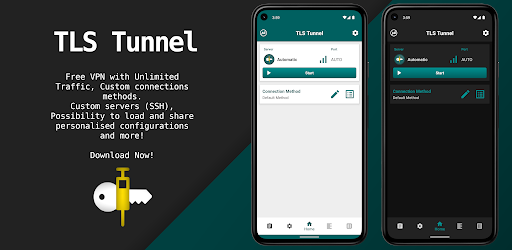
TLS Tunnel APK is an Android VPN application designed to help users establish encrypted network connections, access configurable VPN servers, and manage their internet traffic through different connection methods. It offers a custom connection protocol called TLSVPN, support for private SSH servers, IPv6 connectivity, and additional settings for users who want more control over their network configuration.
The app is designed for both everyday users and advanced users. Beginners can explore the available VPN connection options, while experienced users can configure their own servers, customize connection settings, and use features such as Server Name Indication (SNI) when their server supports it.
TLS Tunnel is described by its provider as free to use, without mandatory registration or payment. However, your actual privacy, connection speed, and security depend on the server you use, your configuration, and the network environment.
What Is TLS Tunnel?
TLS Tunnel is a VPN application for Android that aims to establish network connections through its TLSVPN protocol or supported private server configurations. It is intended for users who want to manage their connection settings, protect traffic in supported configurations, and connect through different types of servers.
The application offers official servers as well as a Private Server option for users who want to connect to their own SSH server. Depending on the configuration, users can customize connection text and use SNI for servers prepared to receive such connections.
The supplied description also highlights IPv6 support, low background battery consumption, an Always-On VPN option through Android settings, and optional communication between users connected to the same official server.
It is important to understand that a VPN does not automatically guarantee complete anonymity or protection against every online threat. The level of protection depends on the implementation, server operator, configuration, and the applications you use.
TLS Tunnel APK Information
| App Name | TLS Tunnel |
|---|---|
| Category | VPN / Network Utility |
| Platform | Android |
| Connection Protocol | TLSVPN, according to the supplied description |
| Private Server Support | SSH, using supported server configurations |
| Network Support | IPv4 and IPv6 features, depending on the server and configuration |
| Pricing | Described as free by the provider |
| Registration | No registration required, according to the supplied description |
Note: The current app version, APK file size, minimum Android requirement, and compatibility details were not included in the supplied description. Check the current official listing before installing.
Key Features of TLS Tunnel
1. TLSVPN Connection Protocol
TLS Tunnel uses a proprietary protocol called TLSVPN for connections to its official servers, according to the supplied description. The provider states that the protocol uses TLS 1.3, a security protocol also used to protect many HTTPS connections.
Encryption can help protect network traffic while it travels between your device and the VPN endpoint. However, the presence of TLS alone does not prove that every part of a VPN service is secure. The actual protection depends on how the protocol is implemented, how certificates and connections are validated, and how the server handles your traffic.
If privacy is your priority, review the provider’s current documentation and privacy policy rather than relying solely on an encryption claim.
2. Free VPN Connectivity
The supplied description presents TLS Tunnel as a free application that does not require registration or payment to use its service.
This may appeal to users looking for a VPN option without a subscription. However, free access should not be confused with a guarantee of unlimited speed, uninterrupted availability, or identical performance across every server and network.
Before relying on any VPN for sensitive activities, understand the service’s privacy practices and the limitations of the connection you choose.
3. Custom SSH Server Support
One of TLS Tunnel’s advanced features is the Private Server option. According to the supplied description, users can connect to their own server through standard SSH on port 22, provided the server is configured appropriately.
This option is useful for experienced users who want to manage their own server connection instead of relying exclusively on the app’s official servers.
With a private server, you are responsible for important aspects of security, including server maintenance, access credentials, software updates, and the server’s network configuration.
4. Custom Connection Text and SNI
TLS Tunnel provides additional connection customization options for compatible configurations. The supplied description mentions customizable connection text and Server Name Indication (SNI).
SNI is a TLS extension that allows a client to indicate the hostname it wants to reach during a TLS handshake. Its use depends on the server and network configuration, and it does not automatically make a connection secure or guarantee that network restrictions can be bypassed.
Use these settings only when you understand the configuration and have authorization to connect to the relevant server.
5. IPv6 Connectivity
The supplied description states that the official TLS Tunnel servers support IPv6 routing in addition to IPv4-related connectivity.
IPv6 is the newer version of the Internet Protocol and is used by modern networks and services. Support for IPv6 can be helpful when your network or destination services use this protocol.
Actual connectivity and performance still depend on your device, internet provider, server, routing, and the destination you are accessing. IPv6 support alone does not guarantee faster internet.
6. UDP Support for Compatible Connections
According to the supplied description, the official servers allow IPv4 and IPv6 protocol traffic, while SSH private servers route TCP traffic only by default.
This distinction matters for applications that rely on UDP, including some online games and real-time communication services.
The description notes that UDP routing through a private SSH server requires an additional UDP Gateway, such as badvpn-udpgw. This depends on a suitable server setup and should not be assumed to work automatically with every private server.
7. Always-On VPN Option
TLS Tunnel can be used with Android’s Always-On VPN feature, which is configured through the device’s system settings.
When enabled and supported by the device configuration, Always-On VPN can help keep the VPN connection active and reduce the chance of applications accessing the network outside the intended VPN connection. Android also provides an option to block connections that do not use the VPN on supported configurations.
Check your Android version and system settings before enabling these options. If the VPN disconnects or is incorrectly configured, network access may be interrupted.
8. Battery-Conscious Background Operation
The provider describes TLS Tunnel as optimized for low background battery consumption.
Actual battery usage can vary depending on signal strength, server distance, connection stability, background activity, device settings, and how often the VPN reconnects.
If you notice unusual battery drain, compare usage with different network conditions and check your Android battery settings. No VPN can guarantee zero battery impact.
9. Optional Communication Between Users
The supplied description says that traffic between users is isolated by default on the official servers. It also describes an optional feature that allows communication with other users connected to the same server through a generated internal IP address.
This feature is intended for specific use cases and is disabled by default according to the description.
Keeping network isolation enabled is the safer choice if you do not need this functionality. Only enable additional communication features when you understand the potential security implications.
Official Servers vs. Private SSH Servers
TLS Tunnel offers different connection options, and understanding the difference between official servers and private servers is important when choosing a configuration.
| Feature | Official Servers | Private SSH Servers |
|---|---|---|
| Connection method | TLSVPN service | SSH with a compatible server |
| Server management | Managed by the service provider | Managed by you or the third-party server owner |
| Customization | Uses the service’s available settings | Can support custom SSH and SNI settings when configured |
| UDP routing | Described as supported for IPv4 and IPv6 protocols | Requires additional UDP Gateway setup for UDP traffic |
| Trust and privacy | Depends on the provider’s practices and policies | Depends on the server owner, configuration, and policies |
Important: TLS Tunnel’s provider states that it is not responsible for third-party private servers. If you connect to a server owned by someone else, that operator may control how the server is maintained and how traffic is handled. Avoid entering sensitive information through servers you do not trust.
How to Use TLS Tunnel on Android
The exact setup depends on whether you use an official server or configure your own private SSH server. These general steps can help you get started.
- Install the app from a trusted source: Prefer the official app listing or another verified distribution channel.
- Open TLS Tunnel: Review the available connection options and permissions.
- Choose a connection method: Select an official server or the Private Server option if you have a suitable server configuration.
- Configure the required settings: For a private server, enter the connection details and any supported options required by your server.
- Connect to the VPN: Follow the app’s prompts and approve the Android VPN connection request when appropriate.
- Check your connection: Confirm that the VPN is connected and test whether the services you need are working.
- Review system settings: If required, configure Android’s Always-On VPN feature and other supported VPN options.
Do not copy random server configurations or credentials from untrusted sources. Incorrect settings may prevent a connection from working, while unknown server operators can introduce privacy risks.
Tips for Better TLS Tunnel Performance and Security
- Choose a trusted server: The server operator is an important part of your privacy and security model.
- Use official servers when appropriate: These avoid the additional trust concerns associated with unknown third-party servers, though you should still review the provider’s privacy policy.
- Keep your app updated: Use a trusted source to obtain updates and security fixes.
- Check server compatibility: Confirm that your private server supports the SSH, SNI, and routing options you intend to use.
- Understand TCP and UDP: A private SSH configuration may not support UDP traffic without additional components.
- Keep optional network sharing disabled unless needed: Enabling communication between connected users may change your network exposure.
- Use Always-On VPN carefully: Check Android’s VPN settings and understand that strict VPN options can interrupt internet access if the connection fails.
- Do not assume complete anonymity: A VPN changes how traffic is routed but does not prevent every form of tracking, account-based identification, or malicious activity.
- Test for IP and DNS leaks: If privacy matters, use reputable testing services and understand that results depend on your configuration.
Pros and Cons of TLS Tunnel
| Pros | Cons to Consider |
|---|---|
| Described as free to use without registration | Actual speed and reliability may vary by server and network |
| TLSVPN protocol for official server connections | Security depends on the implementation and server practices |
| Private SSH server support for advanced users | Private server setup may require technical knowledge |
| IPv6 and customizable connection options | Some features depend on server configuration and network support |
| Android Always-On VPN compatibility | VPN disconnections or strict settings can interrupt network access |
| Optional network configuration for specific use cases | Third-party private servers may introduce additional trust risks |
Is TLS Tunnel Safe to Use?
TLS Tunnel is designed to establish VPN connections, but no VPN should be treated as an automatic guarantee of complete privacy or anonymity.
When you connect to a VPN, your traffic is routed through the VPN endpoint. This can help protect traffic on untrusted networks when encryption is properly implemented, but it also means you must consider the VPN provider or server operator as part of your trust model.
Official servers and third-party private servers should not be treated as equivalent. A third-party server owner may have different privacy practices, security standards, and logging policies. The app provider explicitly states that it is not responsible for third-party private servers.
For safer use, download the app from a trusted source, review its current privacy policy, keep it updated, and avoid unknown server configurations. Do not assume that using a VPN makes phishing, malware, account tracking, or unsafe websites harmless.
Frequently Asked Questions (FAQs)
What is TLS Tunnel APK?
TLS Tunnel APK is the Android installation package for TLS Tunnel, a VPN application that offers TLSVPN connections, private SSH server support, IPv6-related features, and configurable network settings.
Is TLS Tunnel free?
According to the supplied description, TLS Tunnel is free and does not require registration or payment. Check the current official listing for the latest service information.
Does TLS Tunnel require an account?
The supplied description states that registration is not required. The current app listing should be checked for any changes to its access or connection requirements.
What is TLSVPN?
TLSVPN is the proprietary connection protocol described by the TLS Tunnel provider for its official servers. The provider states that it uses TLS 1.3. The actual security of a connection depends on implementation, configuration, and server practices.
Can I use my own SSH server with TLS Tunnel?
Yes, the supplied description includes a Private Server option for connecting to a compatible SSH server. You need appropriate server details and a configuration that supports the connection method you want to use.
Does TLS Tunnel support IPv6?
The supplied description states that its official servers support IPv6 routing. Actual connectivity depends on your device, network, destination, and server configuration.
Can TLS Tunnel route UDP traffic through a private SSH server?
The supplied description states that SSH private servers route TCP traffic only by default. UDP routing requires an additional UDP Gateway, such as badvpn-udpgw, and a compatible server setup.
Does TLS Tunnel guarantee complete anonymity?
No VPN can guarantee complete anonymity in every situation. A VPN can change your traffic route and help protect supported connections, but tracking through accounts, cookies, device identifiers, malware, or other methods may still be possible.
What is Android Always-On VPN?
Always-On VPN is an Android system feature that can keep a VPN connection active. Depending on your Android version and settings, you may also be able to block network traffic outside the VPN. Strict settings can interrupt internet access if the VPN is unavailable.
Are third-party private servers safe?
Their safety depends on who operates them, how they are configured, and their privacy practices. TLS Tunnel’s provider states that it is not responsible for third-party private servers. Avoid sending sensitive information through servers you do not trust.
Where can I download TLS Tunnel safely?
Use the app’s official distribution source or a verified app store listing. If downloading an APK from another website, verify the source and package identity, and avoid modified files from unknown publishers.
Official Website and Privacy Information
Review the provider’s official information before using TLS Tunnel, especially if you plan to rely on it for sensitive connections.
- Official Website: Verify the current official TLS Tunnel website or app listing before publishing a link.
- Privacy Policy: Review the current policy to understand how connection-related information and other data are handled.
The supplied description did not include a specific official website or app-store URL. No unverified download link has been added to this article.
Final Verdict
TLS Tunnel offers a range of VPN connection options for Android users, including its TLSVPN protocol, private SSH server support, IPv6 features, customizable connection settings, and compatibility with Android’s Always-On VPN functionality.
Its flexibility may appeal to advanced users who want to manage their own server connections, while its stated free access and lack of mandatory registration may interest users looking for a straightforward VPN option.
However, the security and reliability of any connection depend on the server, configuration, and provider practices. Private servers operated by unknown third parties deserve particular caution, and a VPN should not be considered a guarantee of total anonymity.
Before installing TLS Tunnel APK, confirm the current app version, Android compatibility, and download source. Review the privacy policy and choose a server you trust before routing your internet traffic through it.
Whats Mod of TLS Tunnel: Fast Secure VPN
Premium UnlockedWhats News of TLS Tunnel: Fast Secure VPN
OpenSSL 3.5.9 IO changes Buffer size reduction Ad reduction Update of some librariesDisclaimer: This article is an independent informational overview based on the supplied app description. It is not an official security audit or a guarantee of VPN performance, privacy, or anonymity. Features and compatibility may change between versions.
 Show/Hide
Mod info
Show/Hide
Mod info