Download YoWindow Weather APK



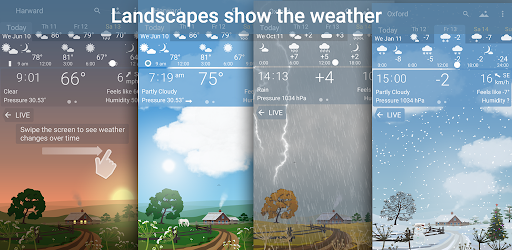
You can also move through the timeline to preview how the weather is expected to change during the day. With current conditions, multi-day forecasts, customizable scenery, and weather-related features, YoWindow offers a different approach to everyday weather updates.
In this guide from EP Apk, you’ll learn about YoWindow’s main features, its animated weather scenes, customization options, installation process, and the difference between the free and paid Android editions.
YoWindow Weather APK: App Information
| App name | YoWindow Weather and wallpaper |
|---|---|
| Developer | Weather View LLC |
| Category | Weather and personalization |
| Platform | Android |
| Main features | Animated landscapes, weather forecasts, time scrolling, and wallpaper options |
| Forecast period | Includes forecasts extending up to 14 days, depending on available data and settings |
| Pricing | Free version with ads and in-app purchases |
| Official listing | YoWindow Weather and wallpaper on Google Play |
What Is YoWindow Weather?
YoWindow is a weather application designed around the idea of a living landscape. The scene on your screen changes to represent the weather conditions and time of day, giving you a more visual way to understand the forecast.
For example, a rainy forecast can be represented by rain in the animated landscape, while sunny conditions create a brighter scene. The sun’s position and the transition between day and night are also part of the visual experience.
Unlike a conventional weather app that focuses mainly on numbers, charts, and icons, YoWindow combines weather information with detailed scenery. It is designed for people who want useful forecasts presented in a more relaxing and attractive format.
Key Features of YoWindow Weather APK
1. Living Landscapes That Reflect the Weather
The most distinctive feature of YoWindow is its animated scenery. The landscape changes to represent weather conditions such as sunshine, clouds, rain, snow, and fog, depending on the available weather data and selected scene.
Instead of checking several weather symbols, you can look at the scene to get a quick visual impression of the conditions. Small environmental details help make the experience feel more natural and engaging.
2. Scroll Through the Weather Timeline
YoWindow lets you move through the forecast timeline by swiping across the screen. This makes it possible to explore how the weather is expected to change during the day without opening a separate hourly chart.
- Move through the timeline to inspect different times.
- See how the animated scene changes with the forecast.
- Check expected transitions between sunshine, clouds, and rain.
- Use the visual forecast to help plan outdoor activities.
Remember that this feature displays forecast information, not a guarantee of future conditions. Actual weather can differ from predictions.
3. Sunrise and Sunset Visualization
The app represents the daily movement of sunlight and the transition from day to night. Its animated landscape is designed to reflect local sunrise and sunset timing, making the weather display feel connected to the real world.
This is especially appealing if you enjoy seeing the changing sky and scenery rather than reading only the sunrise and sunset times in a list.
4. Current Conditions and Multi-Day Forecasts
YoWindow provides current weather information along with forecasts for the coming days. Depending on the available provider and settings, the app can also display extended forecasts.
These details can help you decide what to wear, prepare for changing conditions, or plan activities in advance. For important decisions involving severe weather, it is still sensible to check official local weather warnings.
5. Beautiful Landscapes and Seasonal Changes
YoWindow includes different landscape styles, allowing you to choose scenery that suits your preferences. Depending on the edition and available options, you may be able to explore scenes such as villages, cities, valleys, and other environments.
The scenery can also change with the seasons, creating a more dynamic experience throughout the year. This combination of weather information and detailed artwork is one of the app’s defining characteristics.
6. Weather Wallpaper and Home-Screen Features
The free YoWindow Weather and wallpaper edition includes personalization features designed to bring weather information to your device’s interface. Depending on your device and the current app version, available options may include animated wallpaper, widgets, and weather information in the notification area.
These tools make it easier to check the weather without opening the full application every time. Availability and behavior can vary depending on Android settings and the features supported by your device.
7. Weather Data From Multiple Sources
YoWindow uses weather data providers to supply observations and forecasts. Its official help information describes sources such as yr.no, the Norwegian Meteorological Institute and NRK, the US National Weather Service (NWS), and other providers depending on the location, edition, and settings.
The available source can affect the information shown for your area. If the forecast appears inaccurate, check the app’s weather settings and compare important conditions with a trusted local meteorological service.
Free vs. Paid YoWindow for Android
Before installing YoWindow, make sure you choose the edition you want. The developer lists a free version called YoWindow Weather and wallpaper and a separate paid app called YoWindow Weather.
| Detail | Free edition | Paid edition |
|---|---|---|
| App name | YoWindow Weather and wallpaper | YoWindow Weather |
| Cost | Free to install | Paid app; check current store price |
| Advertising | Contains ads | Check the current listing |
| Best for | Users who want to try the app without buying it first | Users who prefer the separate paid edition |
Feature availability can differ between editions and may change with updates. Review the relevant store listing before purchasing or installing either version.
Official links:
How to Get the Best Experience From YoWindow
Choose Your Location Carefully
Weather forecasts depend on the selected location. Allow location access if you want the app to use your current area automatically, or select a location manually if you prefer not to share your device’s location.
Explore the Timeline Before Making Plans
Use the time-scrolling feature to compare the expected conditions at different times of day. If you are planning an outdoor activity, check the forecast again closer to the time because predictions can change.
Try Different Landscapes
Explore the available scenery to find a landscape that you enjoy. A suitable scene can make checking the forecast more pleasant, particularly if you use weather wallpaper regularly.
Review Weather Settings
If the current conditions do not seem right for your area, review the selected location and available weather provider settings. For severe weather alerts, rely on official warnings from your local meteorological authority.
Is YoWindow Weather Free to Use?
The YoWindow Weather and wallpaper edition is available as a free download on Google Play and includes advertisements and in-app purchases. A separate paid edition is also listed by the developer.
Because the app offers different editions, do not assume that every feature is available in every version. Check the current listing for pricing, included features, and purchase details before installing.
How to Install YoWindow Weather on Android
The simplest way to install YoWindow is through its official Google Play listing. This lets you check the app’s identity, current compatibility information, and available updates.
- Open the official YoWindow Weather and wallpaper listing.
- Confirm that the developer is Weather View LLC.
- Review the app details and compatibility with your device.
- Tap Install and wait for the installation to complete.
- Open the app and select your location or configure location access.
- Explore the forecast timeline and choose your preferred landscape.
If you are considering an APK from a third-party website, make sure the source is trustworthy. Unofficial packages may be outdated or modified, and their safety cannot be guaranteed. Avoid files that request unnecessary permissions or claim to unlock paid features without authorization.
Advantages and Things to Consider
Advantages
- Animated landscapes make weather information more engaging.
- The timeline lets you explore expected weather changes throughout the day.
- Current conditions and forecasts are available in one interface.
- Different landscapes offer visual customization.
- The free edition includes weather and personalization features.
- A separate paid edition is available for users who prefer that option.
Things to Consider
- Forecast accuracy depends on location, data sources, and changing weather conditions.
- Some features may differ between the free and paid editions.
- The free edition contains ads and in-app purchases.
- Animated wallpaper and widgets may affect battery usage, depending on your device and settings.
- Location access may be needed for automatic local weather information.
Frequently Asked Questions
Final Verdict
YoWindow Weather is a distinctive choice for Android users who want more than a standard weather dashboard. Its animated landscapes, visual forecast timeline, sunrise and sunset effects, and customization features make checking the weather a more engaging experience.
The free edition is a sensible starting point if you want to explore YoWindow before considering the separate paid version. As with any weather app, use forecasts as guidance rather than a guarantee, and check official local warnings when conditions are severe.
For the latest app details, visit the official Google Play listing or the YoWindow website.
Whats News of YoWindow Weather
🐽 Pig shows up in front of the stage 🏃️️ Grandpa and Grandma jogging and running. 🚲 Grandma riding a pink bicycle. 😺 Cat may play with the dog's tail. 🪲 Fireflies look awesome while time scrolled. 💪 FIX Google Pixel 11 display issues. 🤖 YoWindow is built for Android 17.Discover more Android app guides, useful tools, and software information on EP Apk.