Download StayFree APK
- Updated
- Version Unknown
- Size Unknown
- Developer ST Pulse
- Genre Productivity
- Google Play


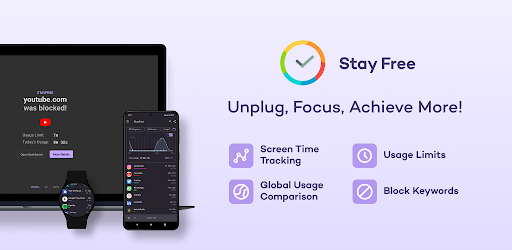
Developed by Sensor Tower, StayFree provides usage statistics, overuse reminders, customizable limits, scheduled blocking, and cross-platform tracking. Whether you want to reduce distractions, improve productivity, or simply understand how you spend your time online, the app gives you tools to make more informed decisions about your daily screen time.
StayFree – Screen Time: App Overview
| App Name | StayFree – Screen Time & Limit App Usage |
|---|---|
| Developer | Sensor Tower |
| App Category | Productivity / Digital Wellbeing |
| Main Purpose | Screen time tracking and app blocking |
| Key Tools | Usage reports, app limits, focus schedules, and reminders |
| Account Required | An account is not required for the described cross-platform connection feature |
| Advertising | Advertised as ad-free |
| Platforms | Android and supported desktop, browser, and Wear OS platforms |
Note: Availability of individual features may vary by platform and app version. Check the official listing for current requirements.
What Is StayFree – Screen Time?
StayFree is a digital wellbeing application that helps you monitor how much time you spend using apps and websites. Instead of relying on guesswork, you can review usage charts, examine your activity history, and identify the apps that consume the largest portion of your day.
The app also includes tools to help you change your habits. You can configure usage limits, receive notifications when you spend too much time in an app, and schedule periods when distracting applications should be blocked.
StayFree is designed for different types of users, from people who simply want better usage statistics to those who want a more structured approach to reducing phone distractions. It can support better digital habits, although lasting improvements still depend on your routines and how consistently you use its controls.
Key Features of StayFree APK
1. Detailed Screen Time Statistics
Understand how you use your phone with detailed usage history, charts, and statistics. Reviewing your daily activity can help you recognize patterns, identify time-consuming apps, and decide where to make changes.
2. App Usage Limits
Set thoughtful limits for applications that frequently distract you. StayFree can help you control excessive usage by restricting access when configured limits are reached, depending on your settings and platform.
3. App Blocking
Temporarily or persistently block applications that take too much of your attention. This feature is useful when you want fewer distractions while studying, working, reading, or spending time with family.
4. Overuse Reminders
Receive reminders when you spend longer than intended in an application. These notifications can help you notice unplanned scrolling and make a conscious decision to stop or switch to another activity.
5. Focus Mode and Scheduled Blocking
Create schedules to block selected distracting apps during specific periods. You can use this feature to establish dedicated work sessions, study periods, or regular breaks from social media.
6. Sleep Mode
StayFree includes a sleep mode designed to help you disconnect from apps at the end of the day. Setting aside time away from your phone can make it easier to establish a consistent evening routine.
7. Cross-Platform Screen Time Tracking
StayFree supports a wider digital wellbeing setup across compatible devices. Its listed ecosystem includes Windows, macOS, Linux, browser extensions, and Wear OS, allowing supported devices to contribute to a broader understanding of your digital activity.
The developer states that users can connect devices without creating an account. Feature availability and synchronization behavior may differ across platforms.
8. Website Usage Tracking
Go beyond total browser usage by examining the websites you visit on supported platforms. This can help you identify whether particular websites are responsible for a significant amount of your online time.
9. CSV Usage Reports
Export usage data as a CSV file for further analysis. You can open the exported information in a compatible spreadsheet application to organize, compare, or review your activity according to your needs.
10. Password Protection for Settings
StayFree offers a setting designed to make it harder to bypass your own restrictions by requiring a password to change app settings. This can add an extra layer of commitment to your personal screen time goals, but it should not be treated as an unbreakable restriction.
11. Home Screen Widget
Use the available widget to see information such as your most-used applications and total usage directly from a supported home screen. Quick access to these statistics can help you remain aware of your habits throughout the day.
12. Simple, Ad-Free Experience
The developer describes StayFree as an ad-free app with a fast, user-friendly interface. Its goal is to make basic usage information easy to understand while also offering more detailed tools for users who want to analyze their habits.
How StayFree Can Improve Your Digital Wellbeing
Tracking screen time is a useful first step, but the real benefit comes from turning information into practical changes. StayFree can help you:
- Reduce unnecessary phone use: Identify apps that consume more time than you intended.
- Improve concentration: Schedule blocks for distracting applications during important tasks.
- Build healthier habits: Use reminders and limits to create more deliberate routines.
- Make time for offline activities: Establish periods for exercise, hobbies, reading, or family time.
- Understand your behavior: Review usage history instead of relying on memory alone.
- Manage multiple devices: Explore compatible cross-platform tracking options where available.
For the best results, start with a realistic goal. For example, choose one distracting app, review your current usage, and gradually reduce the amount of time you spend on it rather than setting limits that are difficult to maintain.
How to Use StayFree – Screen Time
- Install the app: Get StayFree from a trusted source and open it on your compatible device.
- Review the requested permissions: Read the explanations and enable only the access required for the features you want to use.
- Check your usage statistics: Explore the available charts and identify your most-used apps.
- Choose a screen time goal: Decide which applications you want to use less and set a realistic target.
- Configure limits and reminders: Set usage restrictions and overuse notifications for selected apps.
- Create focus schedules: Schedule periods when distracting applications should be blocked.
- Review your progress: Check your usage history regularly and adjust your limits as your habits change.
StayFree Accessibility Permissions and Privacy
According to the developer’s description, StayFree uses Android Accessibility Services to detect which website you are visiting and block websites you have chosen to restrict. Enabling this service can also improve the reliability of usage limits.
Accessibility access can be powerful because it allows an app to interact with certain information or interface elements on your device. Before enabling it, review the permission explanation and the developer’s privacy policy so you understand what information is processed and how it is handled.
The developer states that information is handled according to its Privacy Policy and that permissions operate with the user’s consent. This statement should not replace your own review of the current policy and permission disclosures.
Only download StayFree from a trusted source. If you install an APK manually, verify its origin and avoid modified packages from unknown websites. For more guidance, read our guide on how to check whether an APK download is safe before installing it.
StayFree APK: Pros and Cons
Advantages
- Detailed screen time statistics and usage charts
- Customizable app limits and blocking
- Scheduled focus and sleep modes
- Overuse reminders
- CSV usage data export
- Cross-platform options on supported devices
- Advertised as ad-free
Things to Consider
- Some features require additional permissions
- Website tracking and blocking depend on platform support
- Cross-device setup may require extra configuration
- Usage statistics alone do not change habits automatically
- Manual APK installation requires extra care
Who Should Use StayFree?
StayFree may be useful for students who want to concentrate on studying, professionals who need fewer distractions, and anyone who wants a clearer picture of their daily phone usage. It can also help people who want to establish regular breaks from social media or create more consistent evening routines.
If you only want basic screen time information, the usage charts may be enough. If you need stronger structure, the combination of limits, reminders, and scheduled blocking offers more ways to manage distractions.
Download StayFree APK for Android
Before downloading StayFree APK, check the app’s current availability, compatibility, and permissions. The safest option is to use a trusted official distribution channel whenever possible.
You can visit the developer’s website for information about StayFree and its supported platforms:
Visit the official StayFree website
After installation, review your usage data and configure your first app limit. Begin with a manageable target and adjust your settings as you learn which tools help you stay focused.
Frequently Asked Questions (FAQ)
What is StayFree – Screen Time APK?
StayFree is a screen time tracking and app blocking application that helps you review digital usage, set limits, schedule focus periods, and improve your awareness of phone habits.
Is StayFree an app blocker?
Yes. Its described features include temporary or persistent app blocking, usage limits, and scheduled restrictions for selected applications.
Can StayFree track website usage?
StayFree offers website usage tracking on supported platforms. On Android, its developer says Accessibility Services help detect the website being visited and block websites selected by the user.
Does StayFree work on computers?
The developer describes support for Windows, macOS, and Linux, as well as browser extensions. Available functions may vary by operating system and extension.
Can I connect my devices without creating an account?
The developer states that the cross-platform connection feature can be used without creating an account. Check the current app instructions for the supported setup and synchronization options.
Is StayFree free to use?
The supplied app description presents StayFree as ad-free. Check the current official listing for the latest information about pricing and any feature-specific conditions.
Does StayFree drain the battery?
The developer advertises that the app has no impact on battery life. Actual battery use can depend on device configuration, operating system behavior, permissions, and the features enabled.
Why does StayFree request Accessibility permission?
According to the developer, this permission helps detect website usage, block selected websites, and improve the reliability of usage limits. Review the permission disclosure and privacy policy before enabling it.
Can StayFree help reduce phone addiction?
StayFree can support efforts to reduce excessive phone use through statistics, reminders, limits, and scheduled blocking. It is a self-management tool and cannot guarantee a particular behavioral or health outcome.
Is it safe to download StayFree APK?
Safety depends partly on the source of the APK and the permissions you grant. Prefer a trusted official source, avoid modified packages from unknown publishers, and review the app’s current privacy and permission information.
Final Verdict
StayFree – Screen Time & Limit App Usage offers a useful combination of screen time statistics, app blocking, usage limits, focus schedules, and reminders. Its cross-platform options may also appeal to users who want to understand their digital habits across more than one device.
For anyone trying to reduce distractions or become more intentional about phone usage, StayFree provides practical tools to start making changes. The most effective approach is to review your habits honestly, set realistic limits, and use the app consistently rather than relying on tracking alone.
Whats News of StayFree - Screen Time
Smashing bugs and improving your experienceDisclaimer: EP Apk provides informational content about apps and their features. StayFree is associated with its respective developer. Always verify the source, compatibility, permissions, and current terms before installing an application.