
Download ContraCam APK

- Updated
- Version 2.5.02
- Size 16.3 Mb
- Developer Dmitry Cherevko
- Genre Social
- Google Play


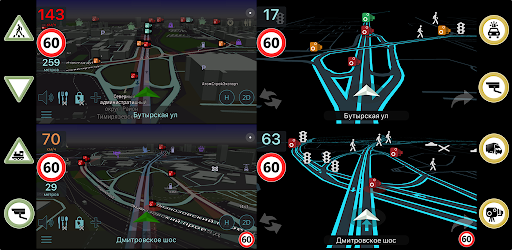
Alongside camera alerts, ContraCam offers offline 2D and 3D maps, voice notifications, speed-limit information, a speedometer, and a heads-up display (HUD) mode. Its camera database can update automatically, helping users keep location information current when an internet connection is available.
In this guide, EP Apk covers ContraCam’s main features, map tools, installation steps, and important safety considerations before using a speed-camera warning app.
What Is ContraCam – Speed Cameras?
ContraCam is a GPS-based speed-camera detector and navigation companion developed by Dmitry Cherevko. It uses your location and stored camera data to warn you when you approach supported camera locations or other mapped road hazards.
Unlike a physical radar detector, a GPS-based application relies on location information and its database of known objects. The accuracy of its alerts therefore depends on the quality and freshness of the database, GPS reception, and the road conditions around you.
The app also includes map tools for viewing roads and points of interest, recording routes, and managing saved locations. For the current Android version and supported features, check the official ContraCam Google Play listing.
Main Features of ContraCam APK
1. GPS Speed Camera Alerts
ContraCam can alert drivers about camera locations recorded in its database. Supported camera types include fixed cameras, average-speed monitoring sections, rear-facing cameras, and dummy camera locations where such data is available.
These alerts are intended to support awareness and safe driving. They do not guarantee that every camera or enforcement location will be detected, and the app should never replace attention to the road or official traffic signs.
2. Road Hazard Warnings
The app can display reported road hazards and other potentially dangerous objects. Users can choose which supported camera and hazard categories they want to monitor, helping them focus on relevant information during a journey.
3. Automatic Database Updates
ContraCam supports automatic updates to its camera and hazard database. The app is designed to download compact updates when connectivity is available, reducing the need to check for new database information manually.
For the most useful alerts, allow the database to update before a trip whenever possible. Offline access to stored data does not mean that new information can be downloaded without an internet connection.
4. Offline 2D and 3D Maps
ContraCam includes specially designed 2D and 3D maps that can be used offline after the necessary map data has been made available on the device. This can be helpful in areas with weak mobile coverage.
Map tools include day and night modes, a world map, saved bookmarks, route tracking, and points of interest. Map coverage and available details may differ between regions.
5. Voice and Sound Notifications
Voice and sound alerts can notify you about selected cameras and hazards. ContraCam can also operate in the background alongside compatible navigation applications, allowing alerts to remain available while you use another app.
Check notification, sound, battery, and background-operation settings before driving. Always set up the app while parked rather than adjusting your phone while the vehicle is moving.
6. HUD Mode
ContraCam includes a heads-up display mode intended to make selected information easier to view. Depending on the supported setup, a HUD-style view can help display driving information in a more convenient format.
7. Built-In Speedometer and Speed Limits
The app includes a GPS speedometer and supports road speed-limit information where available. It can also provide warnings about configured restrictions and lets users define certain speed limits for city and highway driving.
GPS speed readings and map-based speed limits may not always be exact. Follow posted signs and applicable traffic regulations rather than relying exclusively on app information.
8. Route Tracking and Data Export
For users who want to manage route information, ContraCam supports saved tracks, bookmarks, data collections, and folders. It also offers export options for GPX, KML, and CSV formats, which can be useful for working with compatible mapping and data applications.
ContraCam APK – App Information
| App Name | ContraCam – Speed Cameras, HUD |
|---|---|
| Developer | Dmitry Cherevko |
| Category | Maps & Navigation |
| Platform | Android |
| Package Name | com.mybedy.antiradar |
| Price | Listed as free on Google Play |
| Main Functions | Camera alerts, offline maps, GPS speedometer, road hazard warnings, and HUD mode |
| Official Website | contracam.com |
| Google Play | Official app listing |
Note: App availability, supported regions, features, and compatibility can change. Check the official listing for current information before installing.
Does ContraCam Work Offline?
ContraCam supports offline maps and can use camera or hazard data already stored on your device. This means some functions may continue to work when you have no internet connection, provided that the required map and database information has been downloaded beforehand.
However, automatic database updates require connectivity, and GPS-based features depend on your device’s location signal. Offline use also cannot guarantee that all roads, speed limits, or camera locations are fully represented.
How to Install ContraCam on Android
Follow these steps to find the official version of ContraCam:
- Open the official ContraCam page on Google Play.
- Verify the app name and developer information.
- Review the app’s compatibility, permissions, and available safety details.
- Follow Google Play’s installation instructions for your Android device.
- Open the app while parked and review the map, alert, and location settings.
- Download any required map or database information before travelling through areas with limited connectivity.
If you obtain an APK from a third-party website, verify the source and authenticity before installing it. Files from unknown sources may be modified or unsafe. The official Google Play listing is the recommended place to check the app published by its developer.
Important Legal and Driving Safety Information
Speed-camera warning apps are not legal in every country or territory. Before using ContraCam, check local laws governing camera-warning systems and navigation alerts. Follow traffic signs, speed limits, and the instructions of local authorities.
ContraCam is an informational aid, not a guarantee against fines or a substitute for safe driving. Camera databases may contain outdated or incomplete information, and GPS readings can be affected by reception and surrounding conditions.
The developer also warns that continuous GPS operation in the background can significantly reduce battery life. To reduce unnecessary battery use, review your location permissions and background settings, and avoid running location-intensive features when they are not needed.
Frequently Asked Questions
What is ContraCam – Speed Cameras APK?
ContraCam is an Android GPS utility that provides alerts about mapped speed cameras and road hazards. It also includes offline maps, speed-limit information, a speedometer, and HUD mode.
Is ContraCam free to use?
ContraCam is listed as free on Google Play, and its description states that camera and map database updates are available without a subscription. Check the current listing for any changes to its terms or features.
Can ContraCam work without internet?
Yes, some functions can work offline using downloaded maps and stored camera data. Automatic updates require an internet connection, and GPS reception is still needed for location-based functions.
Does ContraCam detect every speed camera?
No. Alerts depend on the app’s database, GPS accuracy, and available road information. A camera may be missing or incorrectly located, so always follow posted speed limits and traffic signs.
Can ContraCam run with another navigation app?
The app supports background operation alongside compatible applications. Whether alerts work as expected depends on device settings, permissions, and compatibility with the navigation app you use.
Does ContraCam drain the battery?
Continuous GPS use in the background can significantly increase battery consumption. Review location and background settings, and disable features you do not need when you are not travelling.
Is using a speed camera warning app legal?
Legality varies by country and territory. Check the applicable local rules before using ContraCam, and always comply with traffic regulations.
Where can I install ContraCam safely?
Use the official Google Play listing to verify the developer and access the Android version available for your device.
Final Thoughts
ContraCam combines GPS speed-camera alerts, road hazard information, offline maps, route tools, and speedometer functions in one Android application. It may be useful for drivers who want additional awareness of mapped road conditions while travelling.
Whats News of ContraCam - Speed Cameras, HUD
• Meet ContraCam 4—it's not just an update, it's a new level of stability and functionality. We've redesigned the app from the ground up, introducing over a hundred new features and thousands of improvements for your comfort and safety on the road. •Before using the app, check the local rules for camera-warning tools, update its database when possible, and remember that GPS and camera information may not always be accurate. For more Android app guides and navigation tools, explore EP Apk.