Download VolumeBooster+ APK

- Updated
- Version 1.2.4
- Size 4.98 MB
- Developer CodeDAC
- Genre Music & Audio
- Google Play


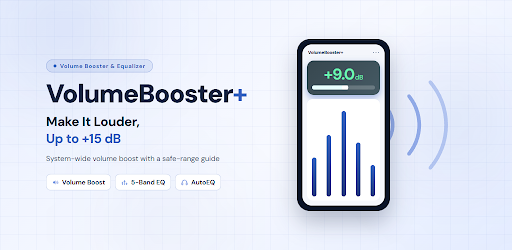
Download VolumeBooster+ APK for Android – Sound Booster & Equalizer
Is your Android phone too quiet when playing music, watching videos, listening to podcasts, or playing games? VolumeBooster+ is designed to make everyday audio easier to hear by boosting system-wide sound and providing tools to customize your listening experience.
The app combines a volume booster, a five-band equalizer, bass enhancement, a 3D virtualizer, and headphone optimization through AutoEQ. It also includes a floating control panel, a sleep timer, and quick controls that help you adjust sound without repeatedly opening the app.
In this guide, you will discover the main features of VolumeBooster+, what you can use for free, how the Pro version differs, and what to consider before increasing your listening volume.
VolumeBooster+ APK: App Overview
- App name: VolumeBooster+
- Category: Audio enhancement and sound customization
- Platform: Android
- Primary purpose: Increase system audio output and customize sound
- Maximum advertised boost: Up to +15 dB with Pro or a qualifying Free Pass
- Free boost limit: Up to +10 dB, with a 60-minute daily limit
- Equalizer: Five bands with nine presets
- Additional features: AutoEQ, Bass Booster, 3D Virtualizer, floating panel, and sleep timer
- Premium options: Monthly, yearly, or lifetime purchase
Note: The developer, current app version, APK file size, minimum Android version, and official download URL were not included in the supplied app description.
What Is VolumeBooster+?
VolumeBooster+ is an Android audio enhancement app that helps users make quiet audio more audible and adjust the way sound is reproduced on their devices. Rather than focusing on a single music player, it is designed to work across much of the Android system, including music apps, video platforms, games, podcasts, movies, and voice messages.
Its main attraction is the combination of volume amplification and sound customization. You can increase the output level, fine-tune different frequency ranges, enhance bass, widen the perceived soundstage, and choose a headphone profile when a matching AutoEQ measurement is available.
The app also displays its applied boost in decibels and uses Safe, Caution, and Danger zones to communicate relative listening risk. These indicators are useful reminders, but they should not be treated as precise measurements of the sound pressure reaching your ears.
Key Features of VolumeBooster+
1. System-Wide Volume Boost up to +15 dB
VolumeBooster+ can increase audio output across supported apps, making quiet videos, music, games, and spoken content easier to hear. The boost is displayed in decibels, allowing you to see how much additional gain you have applied.
The free version supports boosts up to +10 dB, while Pro or a qualifying Max Boost Free Pass unlocks the full advertised range of +15 dB. Actual loudness depends on your phone, headphones or speakers, the original audio, and the playback path.
2. Loudness Maximizer
The Loudness Maximizer uses multiband compression and makeup gain to make audio sound louder while helping control excessive peaks. This can make some recordings feel more consistent in volume, particularly when the original content has a wide difference between quiet and loud passages.
Audio processing cannot eliminate every distortion risk. The result depends on the source material, device limitations, and the level of amplification you apply.
3. Always-On Peak Limiter
The app includes a peak limiter intended to help keep the processed signal under control. This is particularly relevant when combining volume amplification with equalizer adjustments or bass enhancement.
A limiter can reduce certain digital peaks, but it does not guarantee distortion-free playback or protect your hearing from excessive sound levels.
4. Five-Band Equalizer with Nine Free Presets
The built-in five-band equalizer lets you adjust the tonal balance of your audio. Instead of applying the same sound profile to every recording, you can select a preset that better suits your content or personal preferences.
All nine listed presets are available for free:
| Preset | Typical use |
|---|---|
| Flat | A neutral starting point |
| Pop | Mainstream music |
| Rock | Rock and guitar-driven tracks |
| Vocal | Spoken content and vocals |
| Classical | Orchestral and acoustic music |
| EDM | Electronic dance music |
| Movie | Film and video playback |
| Gaming | Game audio |
| Night Mode | A more controlled listening profile at night |
Preset results vary according to the audio source and playback equipment. You can experiment with the available settings to find a balance that sounds clear without becoming harsh or tiring.
5. Bass Booster and 3D Virtualizer
The Bass Booster enhances the low-frequency character of compatible audio, while the 3D Virtualizer is designed to create a wider perceived soundstage.
These features can make music and supported media sound more engaging, but excessive bass can mask vocals and other details. The effect of virtualized audio also depends on the headphones or speakers you use.
6. AutoEQ with Headphone Profiles
AutoEQ is designed to match supported headphones with measurement-based equalization profiles. According to the supplied description, the complete catalogue includes 2,456 measured headphone profiles across 357 brands.
The free version includes mainstream brands such as Apple, Samsung, Sony, Bose, JBL, and Beats, among others. Pro unlocks the complete headphone catalogue, while an AutoEQ Free Pass provides temporary access to the full collection.
For the best results, select your exact headphone model when it is available. A profile intended for a different model may not produce the same tonal balance.
7. Floating Panel for Quick Adjustments
The floating panel lets you adjust the volume boost while another app is open. This is useful when watching a video, listening to music, or playing a game and you want to change the sound without leaving the current screen.
The supplied description lists the floating panel as a free feature. Its availability and behavior may depend on Android permissions and device settings.
8. Hearing Protection Dashboard
The Pro version includes a hearing protection dashboard that shows how much of your listening stayed below the app’s indicated safe level. This provides an additional way to reflect on your listening habits.
However, the displayed decibel value is an estimate based on system volume and applied gain. It is not necessarily a calibrated measurement of the sound reaching your ears, and the app is not a medical device. Do not rely on the dashboard alone to determine whether a listening level is safe.
9. Sleep Timer with Fade-Out
The Sleep Timer can stop your listening session after a selected period, with a gradual fade-out to make the transition less abrupt. The advertised timer range is 15 minutes to two hours.
This can be convenient for people who listen to music, podcasts, or other audio before sleeping.
10. Left and Right Channel Balance
The channel balance control lets you adjust the relative output of the left and right audio channels. It can help when you prefer a different balance between stereo channels or need to compensate for an uneven listening setup.
This setting is an audio adjustment rather than a medical solution for hearing differences. Persistent one-sided hearing difficulty should be discussed with a qualified professional.
11. Quick Settings Tile and Home-Screen Widget
VolumeBooster+ includes a Quick Settings tile and a home-screen widget for one-tap activation or deactivation. These shortcuts reduce the need to open the app whenever you want to change your listening setup.
12. Notification Controls and A/B Comparison
The notification controls provide convenient access to several common adjustments, including changing gain in 1 dB increments, cycling through equalizer presets, and comparing two sound configurations with A/B comparison.
These controls are useful when you want to test whether a change actually improves clarity instead of relying on memory alone.
What Can You Make Louder with VolumeBooster+?
The app is designed to enhance audio from many common Android activities, including:
- Music: Make quiet tracks easier to hear and adjust their tonal balance.
- YouTube and other videos: Increase the output of quiet clips and dialogue.
- TikTok and short videos: Adjust sound without repeatedly changing the system volume.
- Podcasts: Improve perceived loudness for spoken content.
- Mobile games: Customize game audio with presets and other sound effects.
- Movies: Adjust dialogue and overall playback to suit your equipment.
- Voice messages: Make quiet recordings easier to hear when the audio path is supported.
Although VolumeBooster+ is designed for system-wide enhancement, compatibility can vary. Some apps, audio routes, devices, or playback configurations may not respond as expected.
VolumeBooster+ Free vs Pro
The free version includes several useful audio tools, while Pro increases the maximum boost, removes the daily boosting limit, unlocks the complete AutoEQ catalogue, and adds the hearing protection dashboard.
| Feature | Free | Pro |
|---|---|---|
| Maximum advertised boost | Up to +10 dB | Up to +15 dB |
| Daily boost limit | 60 minutes | No daily cap |
| Five-band equalizer | Included | Included |
| Nine equalizer presets | All included | Included |
| Floating panel | Included | Included |
| AutoEQ catalogue | Mainstream brands | Full catalogue |
| Hearing protection dashboard | Not included | Included |
| Advertisements | Free Pass uses an ad; other ad behavior depends on the app’s current terms | Removed |
Feature availability is based on the supplied description. Check the current in-app offer for the latest terms and any regional differences.
What Is the VolumeBooster+ Free Pass?
VolumeBooster+ offers temporary access to selected Pro capabilities through an advertised Free Pass system. According to the supplied description, watching one short advertisement grants 24 hours of access to a particular capability.
- Max Boost Pass: Unlocks the full +15 dB range without the usual daily boosting limit during the pass.
- AutoEQ Pass: Unlocks the complete headphone profile catalogue during the pass.
The description identifies these as two independent passes. This gives users a way to try selected premium functionality without entering payment details or starting a subscription that must later be cancelled.
Confirm the exact pass terms and duration displayed in the app before activating an offer.
How to Download VolumeBooster+ APK for Android
Before downloading an APK file, confirm that you have found the genuine VolumeBooster+ app and that the download source is trustworthy. The supplied description does not include a verified official website or download link, so a specific APK source cannot be confirmed here.
- Find the official listing: Search for VolumeBooster+ on a trusted app store or locate a download link published by the developer.
- Verify the app: Check the app name, developer identity, permissions, version information, and available documentation.
- Download the file: Use the official source whenever possible. Avoid unfamiliar pages that bundle APK files with unrelated installers.
- Review installation permissions: If Android requests permission to install apps from a browser or file manager, enable it only for a source you trust.
- Install and open the app: Follow Android’s installation prompts and review the app’s own setup instructions.
- Start with a low boost: Test the sound at a conservative level before increasing amplification.
Important: Do not assume that an APK advertised as “Pro unlocked” is an official release. Modified APKs can introduce security risks, alter app behavior, or expose your device to unwanted software. A legitimate Pro purchase or an in-app Free Pass is preferable to an unverified modified package.
How to Set Up VolumeBooster+ for Better Sound
Step 1: Start with a Low Boost
Open the app and begin with a modest increase. Play familiar content and raise the level gradually only if necessary. The highest available setting is not automatically the best setting.
Step 2: Choose an Equalizer Preset
Try Flat as a starting point, then compare Vocal for spoken content, Movie for films, or Gaming for games. Switch between presets while listening to the same section so that the differences are easier to evaluate.
Step 3: Adjust Bass and Virtualization
If the audio sounds thin, experiment with a small bass adjustment. If you prefer a wider perceived soundstage, test the 3D Virtualizer. Reduce these effects if they make dialogue unclear or introduce an unnatural sound.
Step 4: Select Your Headphones in AutoEQ
If your exact headphone model appears in the catalogue, select its matching profile. Compare the result with the default configuration and keep the setting that sounds balanced to you.
Step 5: Use Convenient Controls
Set up the floating panel, Quick Settings tile, or home-screen widget if you want faster access. The sleep timer may also be useful for scheduled listening sessions.
Is VolumeBooster+ Safe for Your Hearing?
VolumeBooster+ includes Safe, Caution, and Danger zones based on WHO hearing guidance. These indicators are intended to help users think about their listening levels, but the app’s displayed decibel figure is an estimate derived from system volume and applied gain.
Real sound exposure depends on the phone or computer audio path, headphones or speakers, fit, audio content, and other factors. Consequently, the displayed value should not be treated as a calibrated sound-level measurement or a guarantee that a particular setting is safe.
- Keep the volume as low as practical while still hearing the content clearly.
- Avoid prolonged listening at high levels, particularly through headphones.
- Reduce the volume if sound becomes harsh, uncomfortable, or fatiguing.
- If you experience ear pain, ringing, or a change in hearing, lower the volume and consult a qualified healthcare professional.
VolumeBooster+ is an audio enhancement app, not a medical device or a substitute for professional hearing advice.
Compatibility and System Requirements
VolumeBooster+ is described as an Android application designed to enhance sound across supported apps. However, the supplied information does not specify a minimum Android version, processor requirement, storage requirement, or list of tested devices.
Before installing it, check the requirements shown on the official app listing or the developer’s documentation. Remember that Android audio processing can differ across manufacturers, operating-system versions, connected Bluetooth devices, wired headphones, and individual apps.
Common VolumeBooster+ Problems and Possible Fixes
The Volume Boost Does Not Work
- Check that the app’s boost is enabled and not set to zero.
- Test with another supported audio app to determine whether the issue is app-specific.
- Review any audio or overlay permissions requested during setup.
- Restart playback or reopen the app if the effect stops unexpectedly.
The Sound Becomes Distorted
- Lower the boost and test the same audio again.
- Reduce bass or equalizer adjustments that may be pushing the output too far.
- Compare playback with the Loudness Maximizer or other processing settings changed, where available.
- Remember that the limiter cannot guarantee distortion-free sound in every situation.
AutoEQ Cannot Find Your Headphones
- Check the exact headphone model name.
- Look for a compatible profile rather than selecting an unrelated model.
- Check whether the full catalogue requires Pro or an active AutoEQ Free Pass.
The Free Boost Limit Has Been Reached
The described free plan allows 60 minutes of boosting per day and resets at midnight. You can wait for the reset, review the current Free Pass offers, or consider Pro if you regularly need longer sessions.
The Floating Panel Does Not Appear
Review the app’s setup instructions and Android’s relevant overlay permissions. Device-specific restrictions may affect floating controls, so the exact steps can vary by phone and Android version.
Pros and Cons of VolumeBooster+
Pros
- Designed to enhance audio across many Android apps.
- Advertised boost of up to +15 dB with eligible access.
- Five-band equalizer with nine presets available for free.
- Bass Booster and 3D Virtualizer for additional sound customization.
- AutoEQ headphone profiles, including a free selection of mainstream brands.
- Floating panel, Quick Settings tile, and home-screen widget.
- Sleep timer with a gradual fade-out.
- Temporary Free Pass options for trying selected Pro capabilities.
Cons
- The free version has a 60-minute daily boosting limit.
- The full boost range and complete AutoEQ catalogue require Pro or the relevant Free Pass.
- Actual sound improvement varies by device, audio source, and headphones.
- The displayed decibel value is an estimate rather than a calibrated measurement.
- The minimum Android version and official download source were not provided in the supplied information.
Frequently Asked Questions
What is VolumeBooster+ used for?
VolumeBooster+ is designed to increase Android audio output and customize sound with an equalizer, bass enhancement, virtualization, and headphone profiles.
Can VolumeBooster+ increase volume by +15 dB for free?
The standard free plan supports up to +10 dB. The full +15 dB range is advertised for Pro users or through a qualifying Max Boost Free Pass.
Does VolumeBooster+ work with YouTube and TikTok?
The app is designed for system-wide audio enhancement, including video and social-media apps. However, results may vary depending on the device, app, and audio playback configuration.
Does the free version include an equalizer?
Yes. The supplied description lists a free five-band equalizer with nine presets: Flat, Pop, Rock, Vocal, Classical, EDM, Movie, Gaming, and Night Mode.
What is AutoEQ in VolumeBooster+?
AutoEQ matches supported headphones with measurement-based equalization profiles. The full catalogue is a Pro feature, while the free version includes selected mainstream brands.
How does the VolumeBooster+ Free Pass work?
The described Free Pass system grants 24 hours of access to a selected capability after watching a short advertisement. Max Boost and full-catalogue AutoEQ passes are separate offers.
Is VolumeBooster+ safe to use at maximum volume?
Maximum amplification is not automatically safe. The displayed decibel value is an estimate, and prolonged loud listening can harm hearing. Start at a low level and reduce the volume if it becomes uncomfortable.
Does VolumeBooster+ have a lifetime Pro option?
According to the supplied description, Pro is offered through monthly, yearly, or one-time lifetime purchase options. Check the current in-app pricing and terms before purchasing.
Can I download VolumeBooster+ APK from EP Apk?
Check the relevant EP Apk page for a verified download source and accurate app details before installing any APK. An official download URL was not included in the information available for this article, so no direct APK link is provided here.
Final Verdict
VolumeBooster+ offers a combination of volume amplification and sound customization for Android users who find some audio too quiet. Its five-band equalizer, nine free presets, floating panel, bass controls, sleep timer, and selected AutoEQ profiles provide useful options without requiring every feature to be premium.
The free plan may be enough for occasional adjustments, while Pro is aimed at users who want the full +15 dB range, unlimited daily boost time, the complete headphone profile catalogue, and the hearing protection dashboard.
Before choosing a higher boost level, consider your headphones, the quality of the original recording, and your listening duration. The goal should be clear, comfortable audio—not simply the highest possible volume.
At EP Apk, verify the app’s identity and source before installing an APK. Use an official or otherwise trustworthy download source whenever possible, and avoid modified packages that cannot be independently verified.
Disclaimer: App features and access conditions may change. The information in this article is based on the supplied VolumeBooster+ description and should be checked against the current official listing before publication. VolumeBooster+ is not a medical device, and its estimated decibel display does not guarantee safe listening levels.
Whats Mod of VolumeBooster+: Make It Louder
Pro Unlocked
 Show/Hide
Mod info
Show/Hide
Mod info