Download FaceApp APK

- Updated
- Version 4.5.0.8
- Size 36.29 Mb
- Developer FaceApp Technology Ltd
- Genre Photography
- Google Play


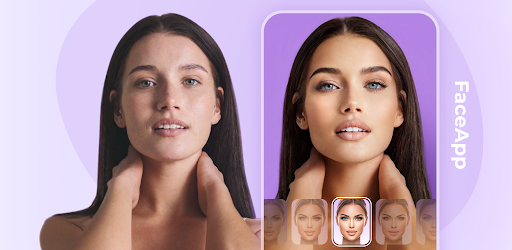
Instead of spending hours editing a portrait manually, you can try different looks with just a few taps. In this guide from EP Apk, discover FaceApp’s main features, learn how to install it on Android, and understand important privacy considerations before editing your photos.
Download FaceApp APK for Android
FaceApp focuses on portrait editing and facial transformations. It includes tools for retouching selfies, experimenting with hairstyles, adjusting the appearance of a portrait, and creating different visual styles.
App name: FaceApp: Perfect Face Editor
Package name: io.faceapp
Developer: FaceApp Technology Ltd
Category: Photography
Platform: Android
Official download: Google Play Store
For the safest installation, use the official Google Play listing. FaceApp is free to download, but some filters and editing tools require a FaceApp Pro subscription or in-app purchase. Availability and features may vary by region and app version.
What Is FaceApp?
FaceApp is a mobile photo editor known for its realistic portrait transformations. It lets you experiment with different appearances, enhance selfies, and create images for personal use or social media.
The app offers a range of filters and editing options, including hairstyle and hair-color changes, beard effects, makeup styles, skin retouching, age transformations, and adjustments to facial features.
Its straightforward editing workflow makes it accessible to users who want to change the look of a photo without learning a complex desktop editing program.
Key Features of FaceApp APK
1. Realistic Face Filters
FaceApp offers portrait filters designed to create natural-looking changes with minimal effort. You can experiment with different styles and compare the results with your original photo.
The final result depends on the quality, lighting, angle, and composition of the original image. Some effects may look more convincing on certain portraits than others.
2. Hairstyle and Hair-Color Changes
Want to preview a different hairstyle or hair color? FaceApp provides tools that let you experiment with different looks before making a real-world change.
- Try different hairstyle options.
- Explore alternative hair colors.
- Experiment with hair-volume effects.
- Compare different looks on the same portrait.
The available styles may depend on the app version and whether the feature is included in the free or Pro experience.
3. Beard and Mustache Effects
FaceApp lets you experiment with facial hair styles, including beard and mustache effects. These tools can help you visualize a different look using an existing portrait.
For better results, start with a clear photo in which your face is well lit and not heavily covered by shadows or objects.
4. Makeup and Beauty Filters
The app includes makeup and portrait-enhancement options that can change the overall appearance of a selfie. Depending on the available tools, you can try different beauty styles and subtle retouching effects.
For a more natural result, avoid applying too many effects at once. Compare the edited image with the original to make sure the final photo still looks the way you want.
5. Skin Retouching
FaceApp includes editing options intended to improve the appearance of portraits, such as reducing the visibility of small blemishes and smoothing skin texture.
These tools are useful for creative editing, but natural skin texture often helps a portrait look more realistic. Use retouching carefully if you want to preserve the original character of the photo.
6. Age and Gender Transformations
FaceApp is widely known for playful transformations that let you explore different possible appearances. Its effects can simulate older or younger looks and provide gender-related transformations where available.
These edits are generated visual effects, not predictions of how a person will actually look in the future. Results should be treated as creative entertainment rather than a scientific forecast.
7. Before-and-After Comparison
Comparing the original image with the edited version helps you judge whether a filter has improved the portrait. FaceApp provides comparison tools during the editing process so you can evaluate changes before saving or sharing your result.
8. Fine-Tune Your Photos
In addition to filters, FaceApp offers adjustment tools for refining the final image. Depending on the version and available features, these may include controls for image appearance, lighting, color, or portrait details.
Experiment with small adjustments first. A few subtle changes can produce a more balanced result than applying every effect available.
9. Share Edited Photos
After finishing an edit, you can save or share your image using the options available on your device. This makes it easy to prepare profile pictures, portrait posts, and other personal images for social platforms.
Before sharing, make sure you have permission to edit and publish photos of other people, especially when the transformation changes their appearance significantly.
How to Download and Install FaceApp on Android
Follow these steps to install FaceApp using the official source:
- Open the FaceApp page on Google Play.
- Check that the app is published by FaceApp Technology Ltd.
- Confirm that the app is compatible with your Android device.
- Tap Install and wait for the installation to finish.
- Open FaceApp and select a photo you want to edit.
- Choose a filter or editing tool and preview the result.
- Save or share your edited image using the available options.
If you are looking for an APK because Google Play is unavailable on your device, be cautious with third-party downloads. An APK may be outdated, modified, or bundled with unwanted software. Avoid unofficial versions that promise unlocked premium features or request unnecessary account information.
Is FaceApp Free to Use?
FaceApp is free to download, and the app provides some editing features without a paid subscription. However, additional filters and tools may be available only through FaceApp Pro or other in-app purchases.
Before subscribing, review the features included in the current plan, the subscription price shown in your app store, and the renewal terms. Pricing and trial availability can vary by country and platform.
For the latest details, visit the official FaceApp free-use FAQ.
FaceApp Privacy: What You Should Know
Photo editing apps can handle personal images, so it is important to understand how your selected photos are processed before using them.
According to FaceApp’s published privacy information, photos selected for editing may be temporarily cached on cloud servers to provide editing functionality. The company states that these cached photos are automatically deleted within a limited period, generally 24 to 48 hours after the last edit.
FaceApp also provides an option to request earlier deletion of its cloud photo cache through the app’s settings. Review the current privacy policy for the full details, because data practices and app features can change.
- Select photos carefully: Only upload images you are comfortable editing with the service.
- Review permissions: Check the app’s access to your photos and other device features.
- Avoid sensitive images: Think carefully before submitting private or confidential photos for cloud processing.
- Review deletion options: Check the app settings if you want to request removal of cached photos.
- Read the privacy policy: Understand how selected images and other information are handled.
Read the official FaceApp Privacy Policy and its photo-retention FAQ for more information.
Advantages and Limitations
| Advantages | Limitations |
|---|---|
| Quick portrait editing | Some tools require FaceApp Pro |
| Wide range of facial filters and effects | Results vary with photo quality |
| Hairstyle, makeup, and age transformations | Heavy editing can look unnatural |
| Simple workflow for casual users | Selected photos may be processed in the cloud |
| Easy to save and share edits | Features and pricing can change over time |
Frequently Asked Questions
Is FaceApp APK free to download?
FaceApp is free to download through Google Play and includes some free editing tools. Certain filters and features require a paid FaceApp Pro subscription or an in-app purchase.
Can FaceApp change my hairstyle?
Yes. FaceApp offers hairstyle and hair-color effects that let you experiment with different looks on a portrait. The available options may depend on your app version and subscription.
Does FaceApp upload photos to the cloud?
According to FaceApp’s privacy policy, photos specifically selected for editing may be temporarily cached on cloud servers for processing. Review the current policy to understand retention periods and available deletion controls.
Can I use FaceApp to edit photos for social media?
Yes. You can use its editing tools to prepare portraits and selfies for sharing. Make sure you have the right to use any photo you edit or publish, particularly when it includes other people.
Where should I download FaceApp for Android?
The official Google Play listing is the recommended source for compatible Android devices. Check that the developer is FaceApp Technology Ltd and avoid modified APK files from unknown websites.
Final Thoughts
FaceApp is a convenient option for users who want to experiment with portrait filters, hairstyle changes, makeup effects, and realistic-looking transformations without using complicated editing software.
Its free tools can be useful for everyday edits, while some additional features are reserved for the Pro subscription. Before uploading personal photos, take time to review the privacy policy and understand how selected images are processed.
For a safer installation, download FaceApp from the official Google Play listing and keep the app updated.
Official download: Download FaceApp from Google Play
Whats News of FaceApp: Perfect Face Editor
Minor fixes and stability improvements are here for a smoother FaceApp experience.Privacy Policy: Read FaceApp’s Privacy Policy